Build Macros packages with Claude, inside the running editor
If you want Claude to write a Macros package for you, connect it to the editor through the built-in MCP server before you ask for anything. Once it's connected, Claude stops guessing. It looks up the API your build actually has, runs code in the live editor, and reads back the buffer it just rendered. You end up reviewing a package that already works, not a plausible-looking file you still have to debug.
A Macros package is only a git repo with a .scm file in it. The format was never the hard part. The hard part is knowing which of the editor's primitives exist and what they're called, and then noticing when a table renders one column off. An assistant that can only see your files gets both of those wrong in ways that look right. The MCP server fixes that, and it comes down to three things.
1. Connecting takes about a minute
Turn the server on with M-x mcp-server-start, then run M-x mcp-server-info. It prints the exact command to register the server with Claude Code, token included:
claude mcp add --transport http macros http://127.0.0.1:7811/mcp --header "Authorization: Bearer <token>"
Paste that into a terminal and you're done. The server only listens on 127.0.0.1 and wants the token on every request. Still, eval can do anything your editor can, so I switch it off when I'm finished.
2. Claude reads the real API before it writes anything
I start every package with the same instruction: "call api first." With no arguments, the api tool returns an index of every primitive category in the running editor (buffers, overlays, processes, sqlite, http and so on). With a category, it gives you the signatures and docs. It's generated from the build you're connected to, so it can't be stale.
This is where most of the time gets saved. Without it, Claude writes Emacs Lisp idioms in Scheme, or calls a function that sounds right but doesn't exist. With it, the first draft uses things like section-open, textplot-sparkline and async-lane-run correctly, because it just read how they work.
3. It closes its own loop: eval, look, fix
Point your config at the working tree while you build:
(package-install-local "~/code/my-package")
From there the loop goes like this. Claude edits the file, evals the definitions that changed, runs the command, then checks the result with buffer_text (which can include face spans) and messages, where errors from hooks and async callbacks end up. If a column is misaligned or a callback blew up, it sees that before you do. I mostly watch and steer.
One caution. eval runs on the same thread as your keymaps, so an infinite loop will freeze Scheme until you restart. Tell Claude to test risky code in small pieces.
What it produces
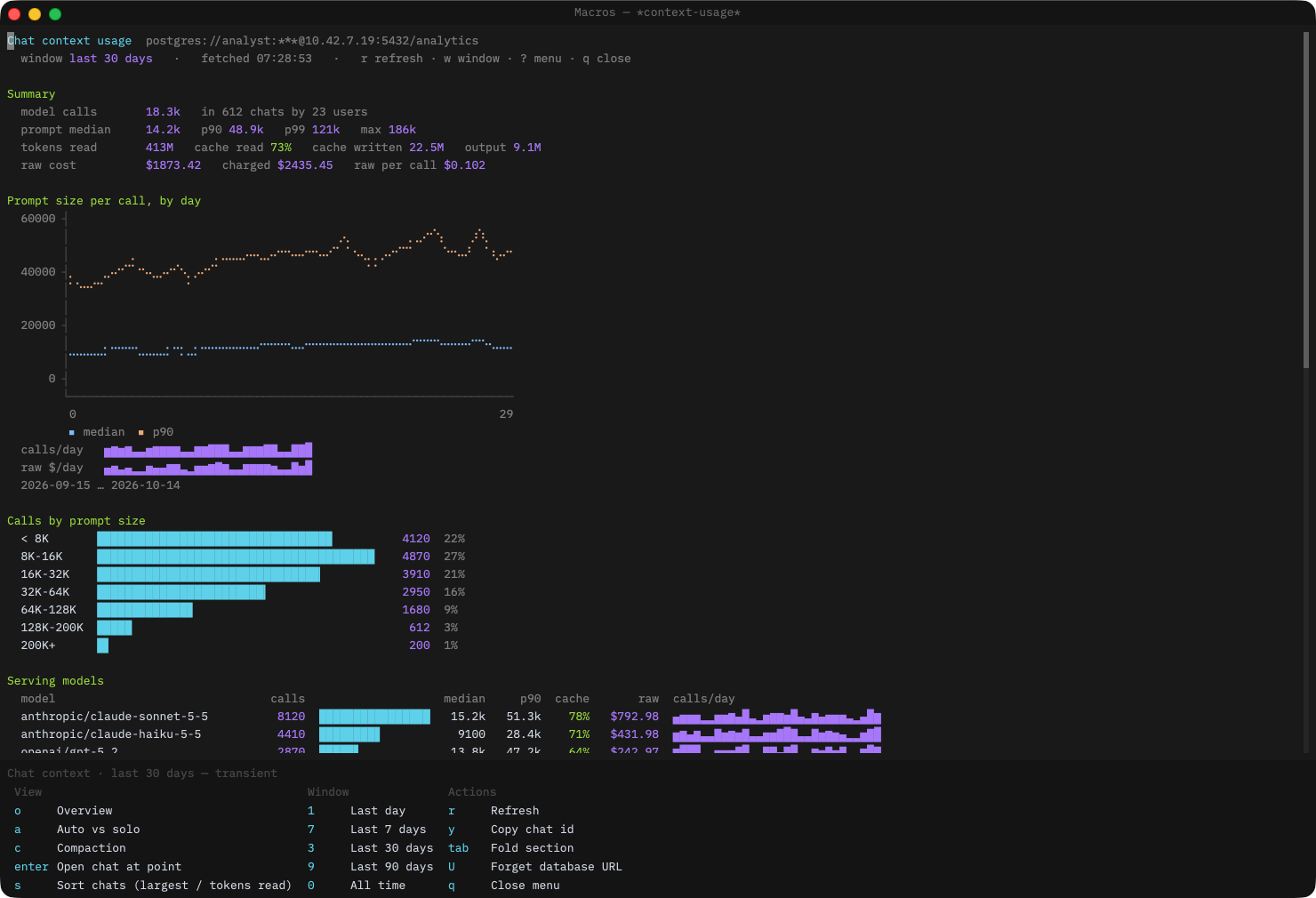
I recently needed a dashboard to measure some AI context data: how big our prompts get, which models serve them, and what each turn's context is made of. Claude wrote nearly all of its roughly 1,500 lines of Steel using exactly this loop: read the api, write a section, eval, read the buffer back, and fix whatever looked off.
It works like magit. Press ? and a menu pops up at the bottom with every view, time window and action on a single key.
The view I actually built it for was a comparison. I wanted to know whether letting Auto mode pick the model per turn beats staying on one specific model. Press a and it lines the two up: cost per turn and per chat, prompt size, cache reads, thumbs-down rate, and where Auto's money goes. It also splits the comparison by chat length, since a short chat and a long one aren't really the same kind of work. Every name, host and number in these screenshots is synthetic.
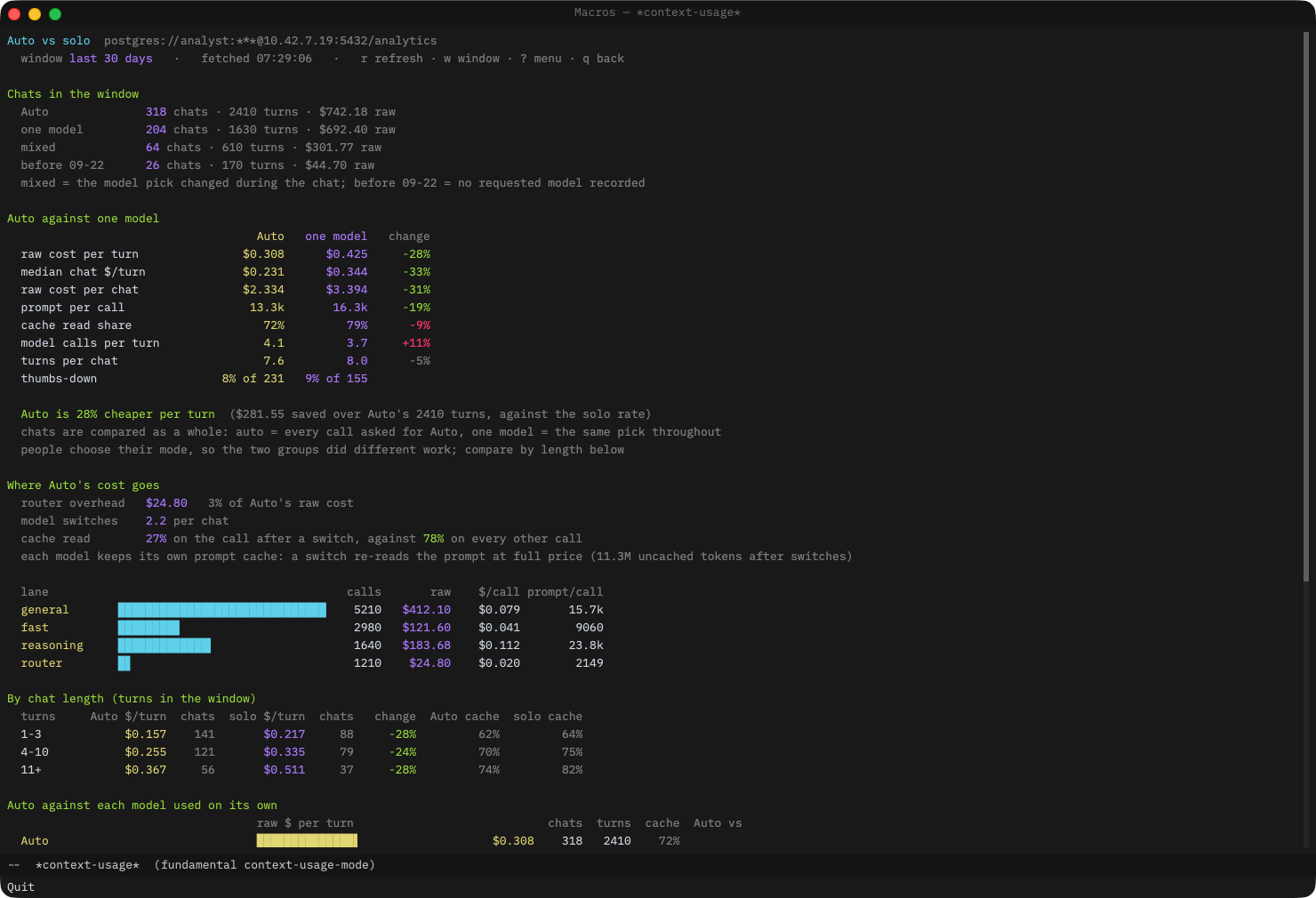
None of this is beyond a hand-written package. Psql runs as a background process so a slow query never freezes the editor, the password comes from the secrets store and goes to psql through the environment, never argv, and C-g cancels a fetch. The difference is that I didn't have to know every one of those primitives going in. Claude looked them up, tried them, and saw what came back.
When the package is done, push it to a git repo and tag a release. Then anyone can install it with package-install and pin a version with 'ref. The Packages and MCP server docs cover the details.