Grid formulas
Type = in a grid cell and you're writing an Excel formula. The engine was written from scratch for Macros, but it follows Excel's rules closely enough that the formulas you already know — and the workbooks you already have — just work. It covers roughly 95% of everyday spreadsheet use; the rest is listed under What's not supported.
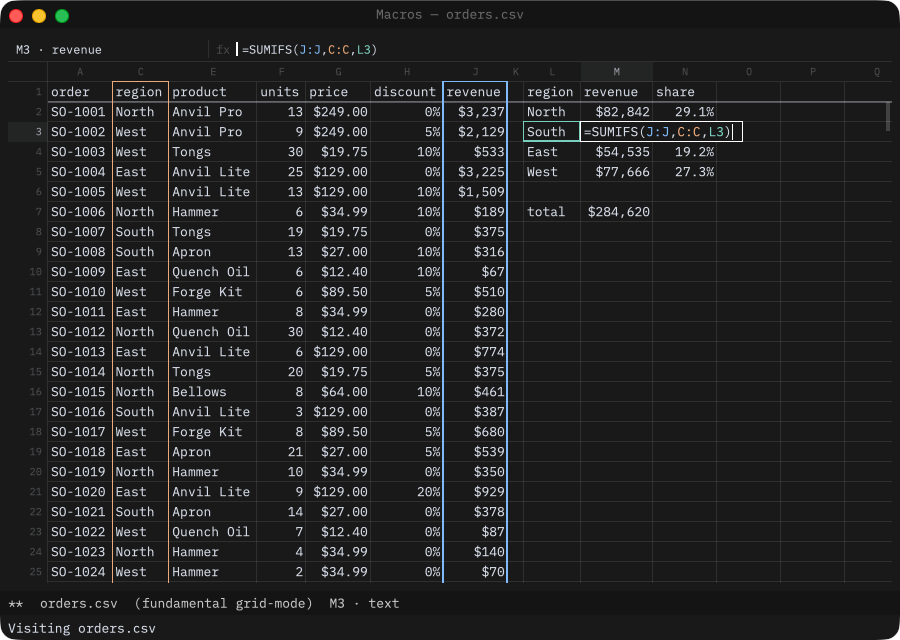
Excel compatible
- The same syntax.
=A1+B1,$A$1,A:A,3:3,B2:D9,Costs!B2,'Q1 Sales'!A:A,"text"&A1,{1,2;3,4},%,^, the spill-range referenceA1#and implicit intersection@, and Excel's operator precedence, including its quirks (=-2^2is4). - The same 155 functions — math, statistics, logic, lookup, text, dates, and information — with Excel's argument order and edge cases. See the list.
- The same values. Numbers are IEEE doubles shown to 15 significant digits, so
=0.1+0.2-0.3shows0just like Excel.ROUND(2.675, 2)is2.68. Dates are serial numbers from 1900,TRUEcounts as 1,"3"+1is4, and comparisons ignore case. - The same errors.
#DIV/0!,#N/A,#NAME?,#NULL!,#NUM!,#REF!,#VALUE!,#CALC!, and#SPILL!behave as in Excel, andIFERROR,IFNA, andISERRORcatch them. A circular reference shows#CIRC!in the cells involved, rather than a dialog. - The same files. Formulas are stored in Excel's English form (
=SUM(A1:A3)), so.xlsxfiles open with their formulas intact and save back with results cached — Excel, Numbers, and Google Sheets show values the moment they open the file.
Writing formulas
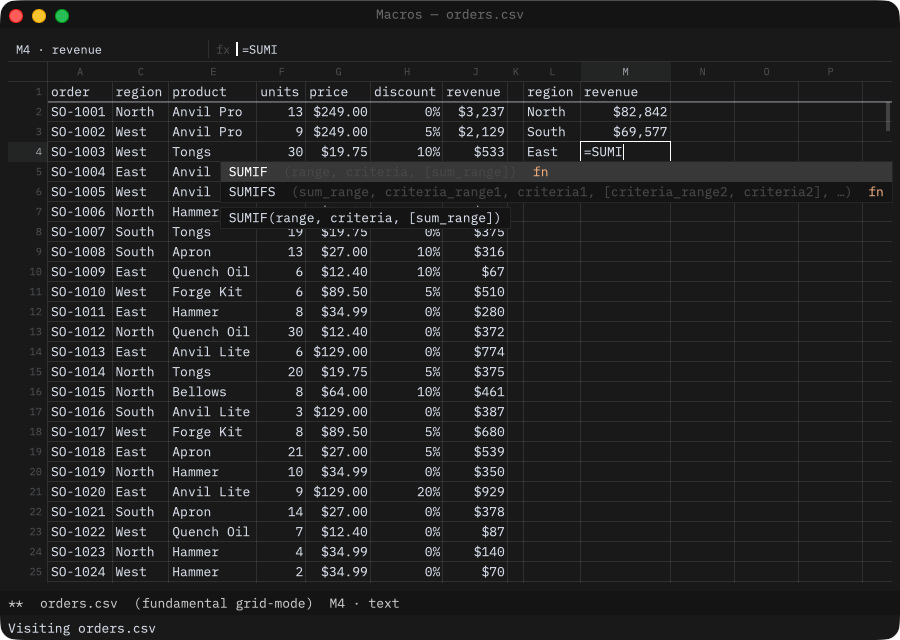
- Completion. Start typing a function name and a dropdown lists matching functions — built-in and your own — with their arguments. ↑ ↓ choose, Tab or RET insert
NAME(, Esc closes the list. - Signature hints. Inside the parentheses, the echo area shows the signature with the current argument marked:
SUMIF(range, «criteria», [sum_range]). - Point mode. Right after
=, an operator,(, or,, the arrow keys (or h j k l) insert a reference and move it around the grid; hold Shift to stretch it into a range. Clicking or dragging over cells does the same. - Colored references. Each reference in the formula gets a color, and the cell or range it points to is outlined in that color.
- Closing parentheses. Commit
=SUM(B4,B5and the missing)is added for you, as in Excel. - Literal text. Start a cell with
'to store text that begins with=:'=not a formula.
Working with formulas
| Emacs | Evil | Action |
|---|---|---|
| C-` | g` | Show formulas instead of results (Excel's Ctrl+`) |
| C-c C-[ | g[ | Trace precedents: outline the cells this formula reads |
| C-c C-] | g] | Trace dependents: outline the formulas that read this cell |
| C-c C-p | gp | Jump to the next error |
| F9 | F9 | Recalculate everything (for NOW, RAND, …) |
The formula bar shows a cell's formula; the cell shows its result. Copying, pasting, filling down (S-RET, C-c d) or right (C-c r), filling a selection (C-RET), and sorting move formulas with their relative references adjusted, and inserting or deleting rows and columns updates every reference that crosses the edit — a reference to a deleted cell becomes #REF!. Copied ranges reach other apps as values, and paste back into a grid as formulas — or as their results with paste values (C-c C-y, zp under evil and helix). A pasted value is the exact number the formula computed (=0.1+0.2 pastes 0.30000000000000004, as Excel keeps it, though the formula showed 0.3), TRUE/FALSE, or the error itself (#DIV/0!, which formulas reading it treat as that error). To freeze formulas where they are, select them and use C-c C-x v (zv): each becomes its current value, as one undo step.
Dynamic arrays
A formula whose result is more than one value spills it, as in Excel 365: =SEQUENCE(5), =SORT(A2:A100), =FILTER(A2:C100, C2:C100>10), =UNIQUE(B:B), or just =A2:A10*2 fill the cells below and to the right of the formula.
- Spilled cells hold no formula. They show values that other formulas read like any cell; selecting one shows the formula it came from greyed in the formula bar. Selecting the formula's cell (or any cell of its spill) outlines the whole spill range.
#SPILL!. If the range a result needs isn't empty — a value, another formula, or another formula's spill is in the way — the formula shows#SPILL!until the range is cleared, then spills again by itself.A1#refers to the whole range the formula inA1spills into, however big it currently is:=SUM(D2#),=ROWS(SORT(A:A)),=COUNTIF(D2#,">3"). It follows the spill as it grows and shrinks.@asks for one value instead:=@A1:A10is the cell ofA1:A10in the formula's own row, as formulas behaved before dynamic arrays.- Files from older Excel versions open as they computed there: wherever such a formula took one value from a range, it gets the
@that Excel 365 also shows (=@A2:A9*2). Saving writes it back in its old form.
Recalculation follows a dependency graph, so an edit only recomputes the formulas downstream of it: 100,000 formulas recalculate in about 50 ms, and an edit feeding 10,000 dependents in about 5 ms.
Saving
.xlsxstores formulas with their results, and the grid's formatting: bold, the palette's text and fill colors, and number formats — for every sheet of the workbook, so saving from any sheet's buffer writes them all. Files that hold something the engine can't write back — charts, other cell styles such as borders, italics or other colors, hidden sheets, defined names, formulas calling functions the engine lacks — open protected: you can view and edit them, and save a copy with:w copy.xlsx, but the original is never overwritten and silently damaged. Having several sheets doesn't protect a file by itself. Dynamic-array formulas are saved the way Excel 365 saves them, with their spilled values cached, so Excel opens them as dynamic arrays and other apps show the values.- Renaming or deleting a sheet rewrites the formulas referring to it in every sheet: a rename follows the new name (
='Q1 Sales'!A1), a delete turns the reference into#REF!, as Excel does. - CSV can't store formulas, formatting or a second sheet, so a CSV never gets formula text written into it, and bold, colors and number formats are never silently dropped. Formulas in a CSV evaluate normally while you work; when you save a CSV that has formulas, any formatting or another sheet, C-x C-s becomes Save As
.xlsx(the prompt says which) and the buffer then visits the new workbook, formatting included. The original CSV is left untouched. Remove every formula and all formatting (M-o d) and the buffer saves as plain CSV again.
Functions written in Scheme
Any Scheme function can be called from a formula:
;; init.scm
(define-grid-function (MARGIN price cost)
  (/ (- price cost) price))

(define-grid-function (TOTAL rows)          ; a range arrives as a list of rows
  (apply + (map (lambda (r) (apply + r)) rows)))
=MARGIN(G2, K2) and =TOTAL(F2:F400) now work in every grid, and appear in completion. Names are case-insensitive in formulas.
- Arguments arrive as numbers, strings,
#t/#f,""for an empty cell, an error as its text ("#N/A"), and a range as a list of rows. Return one value; a list gives#VALUE!. - They never freeze the editor. Grid functions run in their own interpreter on a separate thread. While a call runs, its cell — and everything that depends on it — shows
#CALC!. Results are cached per argument set, so a function filled down 10,000 rows runs once per distinct input. - Runaway calls are stopped. A call that runs longer than
grid-function-timeout— 120 seconds unless you set(grid-function-timeout 30)— is interrupted and shows#CALC!. - They see only their arguments, which keeps the dependency graph exact. Helper procedures a grid function calls are shared with
define-grid-helper:
(define-grid-helper (money x) (string-append "$" (number->string x)))
From Scheme, (grid-formula) reads the cursor cell's formula, (grid-current-value) its result, (grid-set-cell 4 "J" "=SUM(J2:J4)") writes one, and (grid-recalculate) recalculates.
Functions
| Category | Functions |
|---|---|
| Logic | IF IFS IFERROR IFNA CHOOSE SWITCH AND OR XOR NOT TRUE FALSE |
| Math | SUM PRODUCT SUMPRODUCT ABS ROUND ROUNDUP ROUNDDOWN MROUND INT TRUNC MOD QUOTIENT POWER SQRT EXP LN LOG LOG10 CEILING CEILING.MATH FLOOR FLOOR.MATH SIGN PI RAND RANDBETWEEN GCD LCM FACT EVEN ODD |
| Conditional | SUMIF SUMIFS COUNTIF COUNTIFS AVERAGEIF AVERAGEIFS MAXIFS MINIFS |
| Statistics | AVERAGE AVERAGEA COUNT COUNTA COUNTBLANK MIN MAX MINA MAXA MEDIAN MODE MODE.SNGL STDEV STDEV.S STDEV.P STDEVP VAR VAR.S VAR.P VARP LARGE SMALL RANK RANK.EQ RANK.AVG PERCENTILE PERCENTILE.INC QUARTILE QUARTILE.INC |
| Lookup | VLOOKUP HLOOKUP XLOOKUP MATCH INDEX ROW COLUMN ROWS COLUMNS |
| Dynamic arrays | FILTER SORT SORTBY UNIQUE SEQUENCE |
| Text | LEN LEFT RIGHT MID UPPER LOWER PROPER TRIM CLEAN CONCAT CONCATENATE TEXTJOIN SUBSTITUTE REPLACE FIND SEARCH VALUE NUMBERVALUE TEXT FIXED DOLLAR REPT EXACT CHAR CODE |
| Date & time | DATE TIME TODAY NOW YEAR MONTH DAY HOUR MINUTE SECOND WEEKDAY WEEKNUM EDATE EOMONTH DATEDIF DAYS NETWORKDAYS WORKDAY DATEVALUE TIMEVALUE YEARFRAC |
| Information | ISBLANK ISNUMBER ISTEXT ISNONTEXT ISLOGICAL ISERROR ISERR ISNA ISEVEN ISODD NA ERROR.TYPE TYPE N T |
What's not supported
The remaining few percent, mostly newer or rarer Excel features:
- Other dynamic-array functions —
RANDARRAY,TRANSPOSE,XMATCH,TAKE,VSTACKand the like. Functions of one value don't spill element by element either:=ABS(A1:A3)shows one value, as before Excel 365 (operators do spill:=A1:A3*2).A1#reads the current sheet only. INDIRECTandOFFSET,LAMBDAandLET, structured table references (Table1[Col]), and data tables.- Iterative calculation — circular references are always
#CIRC!. - Localized function names and separators; formulas use Excel's English form, as Excel stores them.
- Small differences inside individual functions, such as
TEXT()without fraction formats.